Windows 10 Automatic Updates Troubleshooter Tool ...
... can be downloaded here: download.microsoft.com
Ed Bott describes the tool in the [liberaly snipped} article below and Microsoft describes the tool here: support.microsoft.com
Ed Bott also references the fact that Windows 10 will have an option of automatically creating a restore point before installing each new batch of patches from Windows Update, making it easier to roll back an entire batch of updates while you investigate which one is troublesome. He'll have step-by-step instructions for that option later.
>> Microsoft releases tool to hide or block unwanted Windows 10 updates
Ed Bott
The Ed Bott Report | ZDNet
July 27, 2015
zdnet.com
Windows 10 testers who've complained about mandatory updates in Microsoft's new operating system might have a solution at hand. The tool, available as an optional download, lets you hide or block any update for Windows or a hardware driver.
One of the most controversial decisions Microsoft made in its design of Windows 10 is a fundamental change to the way Windows Update works. Windows 10 Home offers no way to block security updates and new features. And even the Pro edition has only limited control over updates. ... <snip> ... When Windows 10 arrives this week, Windows Update won't include that option, but Microsoft does have a well-hidden troubleshooter package, KB3073930, which allows you to hide or block Windows Updates and, crucially, driver updates. ... It looks like it should work with the final release beginning July 29.
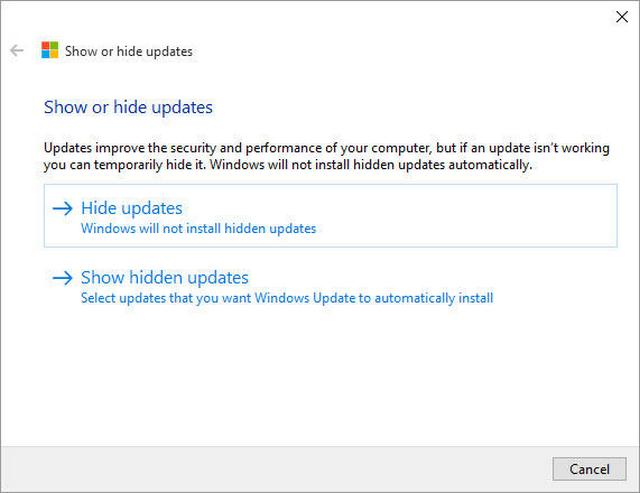
Here's what the troubleshooter looks like when you download and run it:
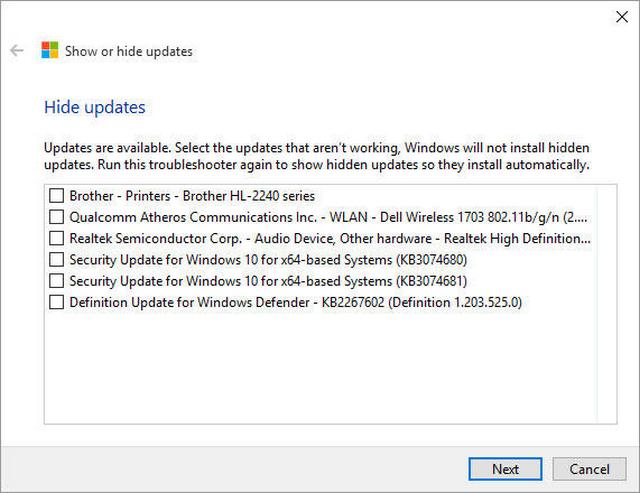
And here's the interface for hiding specific updates. If you've already determined that a Windows update or a driver delivered as part of a Windows Update package is causing problems, you need to uninstall the defective update or remove the problem driver. Then select its entry from this list.
If you find this utility intriguing I recommend one additional Windows 10 tweak. By default, System Restore has been turned off on every system I've tested throughout the preview program. If you re-enable this feature, Windows resumes the practice of automatically creating a restore point before installing each new batch of patches from Windows Update, making it easier to roll back an entire batch of updates while you investigate which one is troublesome. I'll have step-by-step instructions for that option later.
# # #
- Eric L. - |



