| | | Disable Automatic Maximizing of Windows in Win7
How to turn off this annoying feature.
The "Ease of Access Center" is also found in the Control Panel.
SUMMARY: Prevent Windows 7 from automatically docking, resizing, and maximizing windows when you drag them to the screen edges.
Disable Automatic Docking, Resizing, and Maximizing of Windows
malektips.com
Windows 7 comes with a window management feature that is supposed to make it easier to lay out multiple windows on your Desktop. It does this by automatically maximizing or docking windows when you move them to the top or sides of the screen. Plus, as you resize windows and move your mouse pointer towards the screen edges, Windows 7 will resize the windows for you. You'll notice these things happening by the appearance of an outlined rectangle during the move or resize operations.
While some people like this new feature, others would rather not have windows growing by themselves and want more precise control over window sizes. Thus it can be disabled:
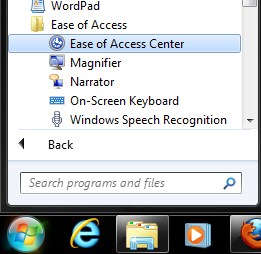
- Click the "Start" menu, choosing "All Programs", "Accessories", "Ease of Access", "Ease of Access Center". Or, click the "Start" menu, type "Ease", and select "East of Access Center" when it appears.
- When the "Ease of Access Center" window appears, scroll down and click on "Make it easier to focus on tasks".
- On the following screen, scroll down and check "Prevent windows from being automatically arranged when moved to the edge of the screen".
* * * |
|



