Windows 10: You'll get updates LIKE IT or NOT – unless you have Enterprise Edition
'You agree to receive automatic downloads without notice'
By Tim Anderson -- July 16, 2015
theregister.co.uk
Microsoft's licensing on the upcoming Windows 10 OS means that most users will find their systems updating on command from Redmond without any option to stop this.
The Licensing Agreement for Windows 10, as found in the latest release candidate build 10240 of Windows 10 Professional, states:
- The Software periodically checks for system and app updates, and downloads and installs them for you.
You may obtain updates only from Microsoft or authorised sources, and Microsoft may need to update your system to provide you with those updates.
By accepting this agreement, you agree to receive these types of automatic updates without any additional notice.
Microsoft's intention is that users will be always up-to-date, not only with security patches, but also with feature updates.
This makes it easier for the company to keep pace with changing technology, and provides developers with a more consistent target for applications.
The downside is that feature upgrades can potentially break applications, or drivers for peripherals such as printers and scanners. Those who value stability above having the latest features may prefer to install security updates only.
Windows 10 does allow this, but only for businesses running the Enterprise Edition of Windows. These customers can opt for the Long Term Service Branch (LTSB), which is updated only every 2-3 years (just like traditional Windows releases).
These LTSB releases are supported for up to 10 years.
Other customers will be either on Current Branch (the only option for Windows Home) or Current Branch for Business (CBB), available if you have a version of Windows Professional or Enterprise.
Businesses with Windows 10 Professional can manage updates to some extent. Microsoft has a new tool, Windows Update for Business, which lets you group machines to be updated into distribution rings, so that more critical systems can be updated later, and specify exactly when updates take place by defining maintenance windows.
It appears though that these tools do not allow updates for Windows 10 Professional to be deferred indefinitely.
- "Customers who are embracing Current Branch for Business do need to consume that feature update within the allotted time period of approximately eight months or they will not be able to see and consume the next security update," ...
... said Helen Harmetz, Micosoft Senior Product Marketing Manager, in a partner training video earlier this year.
LTSB the underminer
In other words, if you bar feature updates, eventually you also bar security updates, putting PCs at higher risk of compromise.
Those who opt for Windows Enterprise and LTSB do not suffer this restriction.
The downside in this case is that unless you purchase it with Software Assurance (SA), a subscription element that adds extended support, and keep that current, then there is no automatic right to upgrade to the next LTSB edition when it comes along.
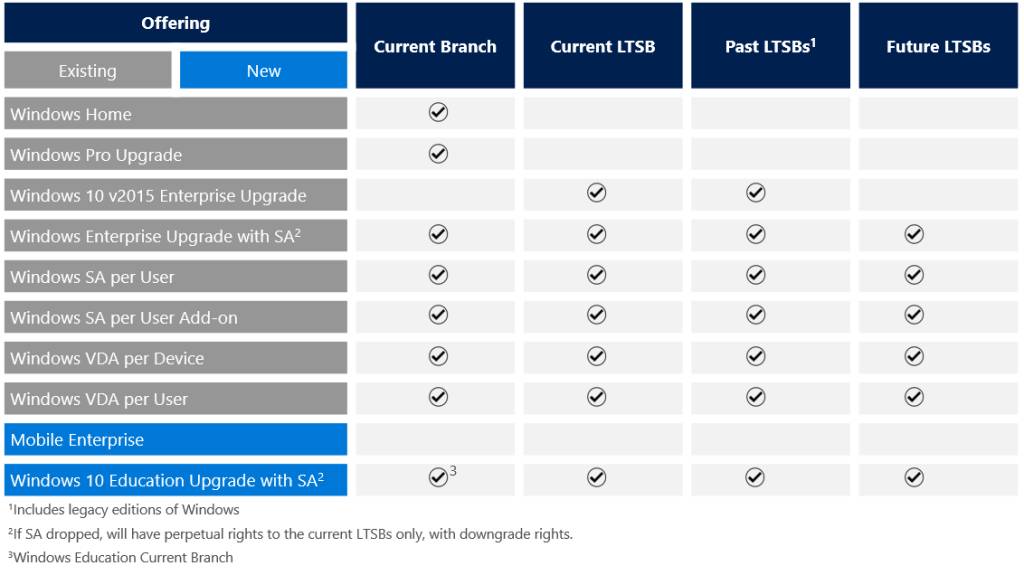
Barring feature updates means you bar security updates, putting PCs at higher risk
You would have to purchase it again, just like traditional Windows upgrades.
The existence of LTSB, and the restrictions placed upon it, undermine the argument that Windows 10 will be a more consistent development target, for those developers selling business applications.
This may be why Microsoft recommends it only for the most critical systems.
As for home users, it looks as if Microsoft is providing the more cautious among them with a good reason to stick with Windows 7 or 8.
* * * |



